Hello, I just started a trial. I’ll admit the user interface takes some getting used to. Can I just check that I initialized correctly (see below). I have two accounts at Schwab: a regular taxable account, and an IRA. The import took me some time because several items didn’t import correctly; e.g., in my case, I’ve had to manually adjust cash.
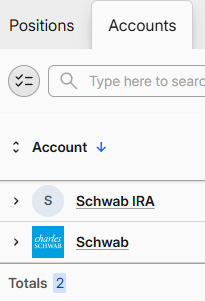
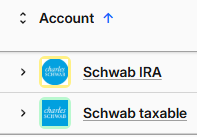
It’s no biggie that my IRA doesn’t have the “Schwab” emoticon, right? I just want to make sure I give the UX a fair shake. A big drawback is that I will need to manually enter trades; I’ve entered 5 already and for some reason the cash didn’t adjust, but I’m sure I did something wrong.
One of my use cases is simply viewing the projected income on in the taxable Account. I just want to make sure I’ve optimize the initial setup before I attempt the next step: to tag or categorize the stocks into their income “sleeve” (e.g, REIT, BDC, derivative ETF). Thanks for any insight or confirmation that I’ve take the right first step. Cheers, David
As with every interface, though I’d love to hear where you struggled the most (interface-wise, ignoring data issues for a minute).
Absolutely not. You can edit the Account at any time and change it’s icon by clicking on the icon in the editing modal (top-left corner).
You mean manually as each trade by hand, or importing a CSV?
There’s an upside to that - automatic account links are less secure, but most importantly less accurate, but that depends on the level of detail you require. For example, they’re mostly useless for tax purposes.
The most important part is if the stock balances are right (ignoring cash for now).
As for the importing and cash balances:
If you’re having issues with Schwab importer, you can send some details to support@mycapitally.com, or send a small sample file if things are importing wrong. You can definitely import all transactions from Schwab for multiple accounts - you should not need to do it manually.
For cash tracking to work you need to enable it. It’s enabled if you selected that you want to track cash in the onboarding. Check in Settings → Cash Tracking.
Once you have it enabled, the second thing you need initial cash balance. Importing with a CSV should handle this for you (if you had Cash Tracking enabled before the import). If you want to enter transactions manually, just add an initial Account Balance transaction on USD on both of the Schwab accounts with the date *prior *to other operations. It can be a Transfer transaction as well to log a deposit. From that point, cash should be tracked automatically.
Thank you! Ah, I didn’t notice the ability to edit the icon. That’s helpful (see below; I assume the image upload will work)
Here is the image I meant to embed in the rich text editor:
Re: “the most important part is if the stock balances are right (ignoring cash for now).”
Okay, I just entered my subsequent trades and (via ChatGPT) addressed a couple of discrepancies. My stock balances are aligned in both accounts, so I feel good about that.
My cash balances are close enough. I did enable “Settings –> Cash Tracking”
It sounds like approximate differences in cash are to be expected. I’ll check assumptions on both platforms (I admit that I don’t know if Schwab is crediting me any interest on my cash balance, and if so, that would create a small difference over a short period of time; i.e., if I want them to match, I’d need to get any interest crediting aligned). I can see Capitally assumes (unconfirmed) future dividends, so I’ll learn about that next …
Thank you for your timely response! I feel better now that I’ve got my initial accounts setup and matching my Schwab.
As for image upload - currently you can only either choose a company logo (you can search for the company name there), an emoji, flag, or URL to a publicly accessible file. Image and document uploads are planned for a future release.
Hi Rafal, sorry, I meant that here in the discorse forum, I was trying to share the image (.png) of the screenshot of my successful account icons. That’s all I meant. I must be dense: it can’t be correct that this forum would not allow image file upload?! In any case, thanka again!
Ah, that makes sense You can share images, but you need to upload them - embedding from external URL might not work. You can simply copy the image and paste it in the editor to upload it.
Thanks, but actually copy/paste image doesn’t work for me (here in this forum). Ironically, if you look above at my OP, the image appears (it wasn’t yesterday). Hmmm, not sure exactly how images work here …
In the first post you uploaded (or pasted) the image. In the second one, you pasted the URL to dropbox. The dropbox URL is not an image - it’s a sharing webpage - but it LOOKS like an image URL, so forum tries to embed it.
In the editor, you have the Link & Upload buttons - use these if needed.
But the fastest way is copy & paste - but you need to copy an image, not an url - eg. by making a screenshot and copying it to clipboard, or right clicking an image in the browser and selecting “Copy” from the menu.
Hi Rafal, thank you but I do understand the difference and I think there is some weirdness. I recorded a video of me attempted to both upload and copy/paste the same image (obviously this is just a dropbox URL to an .mpg):
I fully admit that I do not understand why the image in the OP worked. Although, it didn’t work at first and they appeared when i visited later (the next day), is my recollection. This is obviously not an “issue” , it was just bugging me

 You can share images, but you need to upload them - embedding from external URL might not work. You can simply copy the image and paste it in the editor to upload it.