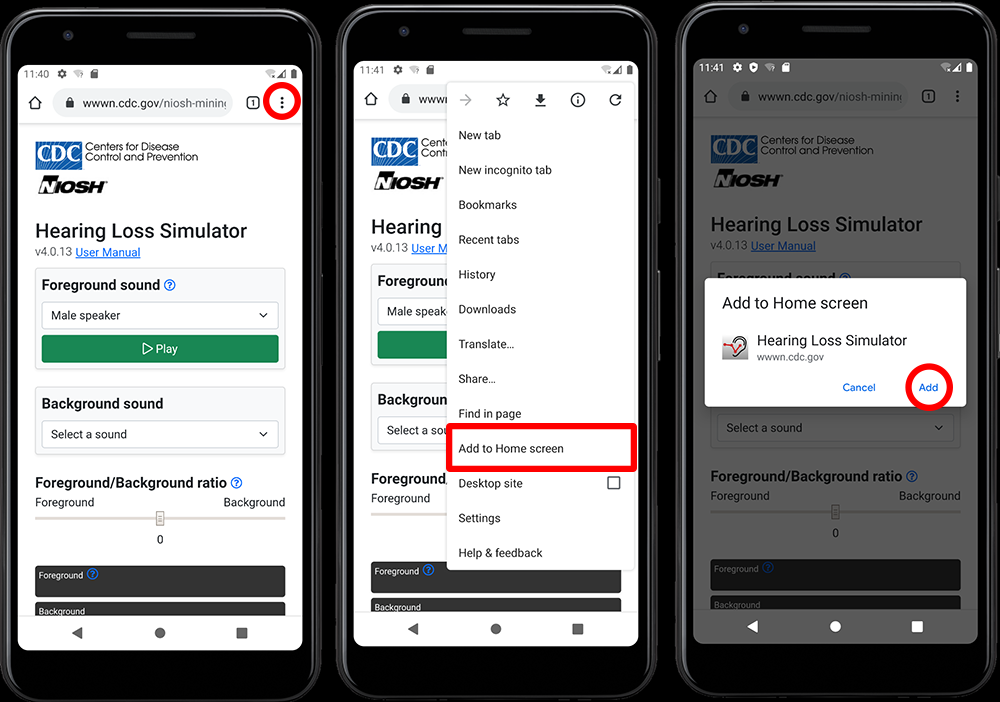
Hi there. Brilliant little project, however some things elude me. I managed to set up my deposit properly, it calculates properly, because I compared the same config in my fund, however:
I am unsure, if the value I can see in the summary for the account, already takes into consideration the capital gains tax. Essentially I want to see the net value of my deposit gains. I am unsure how to set it up, becase the capital gains on bonds is automatically collected in Poland upon “maturing” of the bond itself. Same with deposits. Perhaps fiddling with the block editor does the trick? I assume I would have to create a tax preset for it?
Also, a sidenote, Capitally is a web program only? No adroid, IOS apps? In the documentation there should be a prompt by the browser or smth but it isn’t in IOS/Android Stores nor in the browser version there is any link it.
It’s a bit tricky, as for consumer bonds you don’t ever report taxes, so they’re currently ignored by the tax preset.
In the next version (available tomorrow) it will be possible to set capital tax withheld on generated income transactions - so you will be able to set it to 19% for bonds.
To see the net return on bond you will be able to choose Hold date period, as it will include all payouts and their taxes.
In the next version (available tomorrow) it will be possible to set capital tax withheld on generated income transactions - so you will be able to set it to 19% for bonds.
Thanks. I am not sure if export you get from the govt in this regard already show net value, after taxing or gross, this is a good question. I always assumed it was gross.
@edit
Confirmed with the bank, it’s gross. So whatever is imported into capitally must be lowered by 19%. This is the proper sum, upcooming income will now calculate properly.
So it’s just a shortcut to the site. I have never seen something like this before so I was confused, since the site never prompts you for anything, nor there is anything in the UI referencing an app of any sort. I used logging with a google account, maybe this has something to do with it? Or maybe it’s because I am on trial, who knows.
If you import from obligacjeskarbowe it contains separate tax transactions which are taken into account by our importer. What I wrote above is only for modelling future income.
You need to use Safari on iOS or Chtome on Android. It’s not just a shortcut then, it has separate storage, there’s no browser interface and notifications work.
If you import from obligacjeskarbowe it contains separate tax transactions which are taken into account by our importer. What I wrote above is only for modelling future income.
Ah, I see. Brilliant, then.
I use Chrome 138.0.7204.180, Android 15, nothing occurs like you describe. Can you post some sort of screenshot how it should look like? I have no adblocks or anything, just a stock Chrome.
Checked on a 2nd phone, with older chrome 139.0.7258.62, Android 12 same thing. Something is broken with the frontend apparently.
I’m not gonna lie, this is the 1st time I have ever seen someone implement this as an installation method. A site in the form of an app, it’s brilliant. And it’s definitely cheaper as G and Apple probably would take a cut for merely hosting your app on the store, so clever thinking there.