Export is buggy

Hi.

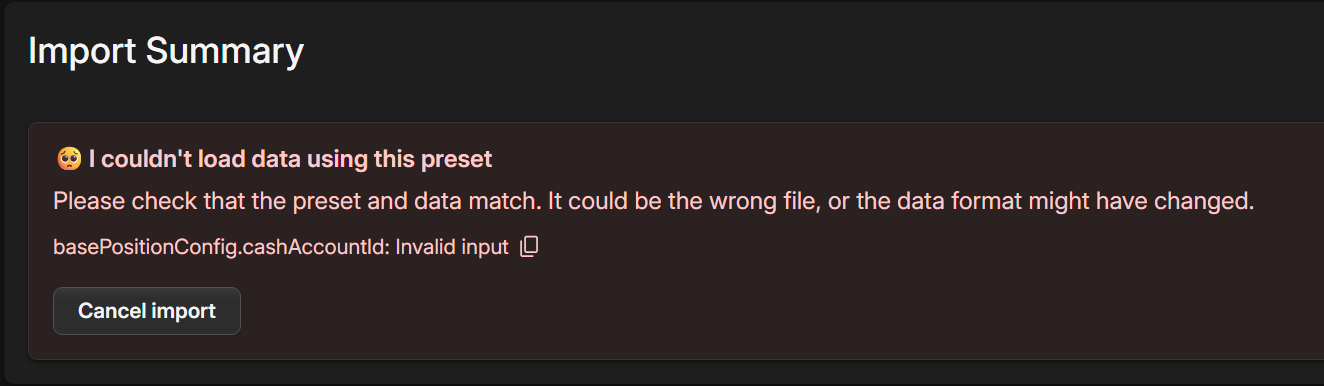
Export, as of now, when done, creates a json file, which when imported back to a new project fails to import. So the feature works only within 1 project?

To reproduce:

  1. I exported the entirety of the project, ticked every checkbox
  2. Made a brand new project, I cannot import my json.

Hi, it’s clearly a bug and it might be caused by the order in which items are recreated when importing.

Did you set a specific account for cash tracking anywhere?

If possible, could you peek inside the JSON file, locate the “cashAccountId” field and tell me what it’s set to?

I indeed did use the cash tracking. I set 1 account to be “main one” in the settings

In the .json there are 2 field with cashTracking:

},
“cashTracking”: true,
“cashAccountId”: “u-5BemyoU5CP2Z1kQ”
},
“userConfigs”: {
“EKOptRiI7xRO5Gvs2Q7LSCYbMhs1”: {
“id”: “EKOptRiI7xRO5Gvs2Q7LSCYbMhs1”,
“explorerOptions”: {
“tableViewConfig”: {
“value.account.full”: {
“view”: “relaxed”
},

and

   "basePositionConfig": {
      "incomeTaxPaid": null,
      "cashTracking": true,
      "cashCurrencyId": null,
      "cashAccountId": "u-5BemyoU5CP2Z1kQ"
    },
    "positionConfigs": {}
  },

I imagine the culprit is the 1st one, maybe I can just replace the old ID with the new one from my new project. I will try in the meantime.

@editedit
I tried to set cashtracking to false and CashAccountID to null, but to no avail.

If you exported everything, then the account should exist in the export. But the order of creating them is important, as the account may not yet exist when the account/asset having this cashAccountId is created.

It’s an omission on our side and a complex one too. It will probably require splitting the import in two - first create all assets & accounts without the configs, then add the configs back.

In your case, you might need to export the main account first (by selecting it), and then everything separately. Then import them in the same order.

I wil ltry to recreate the accounts and then then try, maybe it will work :).

@edit.
Nope, I created all accounts with their names and sub-account structure, but still the same error. Well, I have the source .json, so I can recreate the more obscure positions like deposits from scratch, while importing the rest from the brokerages.
1 Like

Ok, I found a good-enough workaround with a help from the file you sent.

It will be fixed in today’s release.

You have no idea how happy I am :D.

1 Like