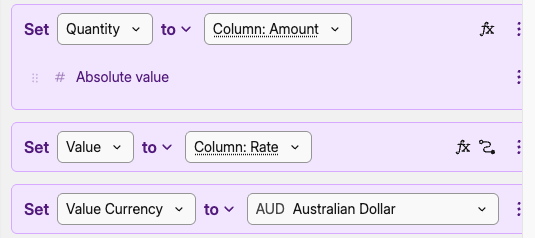
Struggling big time to import crypto transactions from Swyftx. Using the advanced mapper with custom format. I cannot get it to map to my current positions in the crypto exchanges.
What is the difference between “Price” and “Value” ? is Price = Unit price? Is value the transaction total cost not including fees?
In the data below the Quantity of BTC purchsed is 0.0007…
Value is the AUD amount paid INCLUDING fee.
Rate is the Unit price of BTC in AUD
AUD Value fee is the amount of fee in AUD
How do I create custom formula?
Do I have to Set Value = Column:Rate * Column:Amount ? If yes how do I do that?
Finally, how many decimals of the amount are preserved? I can only see 4 in the displayed data, just wondering if it is display only (for Bitcoin it will lead to a lot of inaccuracies if only 4 decimals are preserved…
I still have some discrepancies - just wondering if it’s not related to the timezone - where do you set the timezone in captially? when I say my transaction happened at 6 pm, it’s 6 pm where?
Last question: Assume I have bought ETH on some crypto exchanges at different time for different market prices (ETH/AUD or ETH/USD)
Say now I transfer my ETH to my personal wallet.
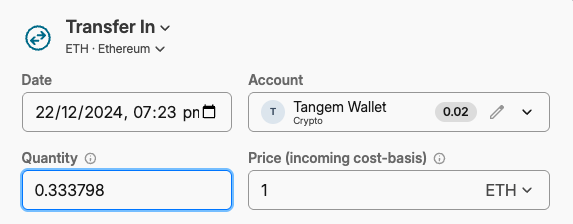
How do I register that into MyCapitally? I did a transfer out (including fees) from the crypto exchange account that I had created and a transfer In with no fees on a “wallet” account.
However I’m unsure what to put as “incoming cost basis” - should I simply say 1 ETH or should I combine the transactions market prices and if so how? it seems I could combine them in different ways and have a different cost basis (a bit like choosing your “lot” for the calculation of CGT) so what do I do? Is it even a good idea to track a wallet separately?
Yes, Price is the Unit price. Value is Price * Quantity. You can set either one or the other in the import. If both are provided, price will take precedence.
In your example, you set the Quantity to Amount, and Price to Rate. You don’t have to set Value at all. You only set it when you don’t have the Price (so it can be calculated).
Any chance you edited the asset yourself? By default it’s called just Bitcoin.
We work with 9 decimal points underneath. The display format will try to limit the number of decimals, but you can change it in Settings → Analysis and set how many decimals you want for quantities.
Capitally works on dates, time is only used for ordering and local timezone is always assumed. So 6pm is your local time zone (wall clock time).
Incoming and Outgoing cost-basis should be the same. If you don’t put anything there, the opening cost-basis will be used for outgoing (the avg cost you bought it for), and current market value for incoming (which is 1 ETH in this case).
So it’s much better to use the Convert / Move transaction, as it will match the cost-basis for you, and by default uses avg one.
Sure! It’s part of your wealth, and with crypto, a pretty volatile one
Btw, did you try using the built-in preset for Swyftx?