Bug when trying to upload a portfolio exported from Capitally

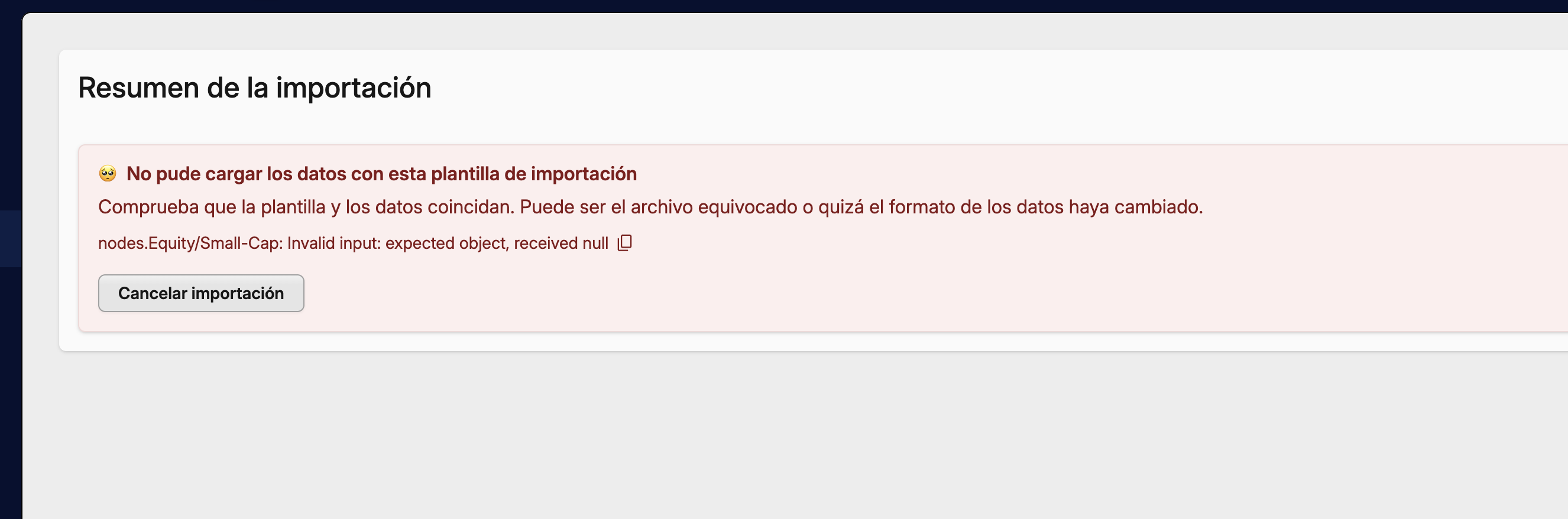
SchemaError

Details:

{
  "name": "SchemaError",
  "issues": [
    {
      "expected": "object",
      "code": "invalid_type",
      "path": [
        "nodes",
        "Equity/Small-Cap"
      ],
      "message": "Invalid input: expected object, received null"
    }
  ],
  "message": "nodes.Equity/Small-Cap: Invalid input: expected object, received null"
}

Stack:


ZodError
    at https://app.mycapitally.com/assets/dedicated-worker-BweVZ6hr.js:1499:27542
    at Aj (https://app.mycapitally.com/assets/dedicated-worker-BweVZ6hr.js:361:31033)
    at rSe (https://app.mycapitally.com/assets/dedicated-worker-BweVZ6hr.js:1499:27530)
    at Y2 (https://app.mycapitally.com/assets/dedicated-worker-BweVZ6hr.js:1524:106877)
    at Array.reduce (<anonymous>)
    at X2 (https://app.mycapitally.com/assets/dedicated-worker-BweVZ6hr.js:1524:106963)
    at Bje (https://app.mycapitally.com/assets/dedicated-worker-BweVZ6hr.js:1659:28648)
Thanks for reporting this. A fixed version should be available tomorrow.

Hi Rafal, it is still giving an error. I am downloading the file from Export (exportar) (.json) and uploading it as Capitally type.

Apologies for the inconvenience. Could you please try again in version v2.47.4? It is being released right now.

Good morning! Yes, it is already corrected :clap::sparkles:

Hi Rafal, I am trying to export a portfolio and import it back. While it works, the calculation of returns is not being done correctly, or at least they don’t match. This is what Claude tells me when comparing the exports of the two projects: “Since qty/value/principal almost always match but returns.period does not, the problem seems to be in how that field was calculated or exported (possibly different date windows, or a calculation/attribution error in one of the two reports), not in the positions themselves. It also drags along the allocation and returnsAttribution.period fields, which depend on those returns.”

First, check that both projects are using the same date range, display currency, and performance calculation options. If they match, attach both JSONs - the original and the one exported after re-importing it - so I can compare exactly what changes in the performance metrics.

Not attach but rather send the JSONs of course - it’s a public forum. Or use a tool that will highlight the differences between them.